- Free Shipping for orders over $249*

- +1 800-943-2341
- Aptika.com


- Aptika.ca

- Currency: USD
 My Account



Evolis releases new driver and firmware for Agilia, Primacy 2, and Zenius 2
Evolis has released Evolis Premium Suite 2 version 9.1.0 (Build 32237), published on October 10, 2025. This update brings new features, enhancements, and important compatibility changes for the Agilia, Primacy 2, and Zenius 2 card printers. Evolis recommends updating to take full advantage of the latest improvements. A complete release history is available on the Evolis website.
Quick facts
- Version - 9.1.0 (Build 32237)
- Release date - October 10, 2025
- Supported OS - Windows (64-bit only), macOS
- Product family coverage - Agilia, Primacy 2, Zenius 2
Important - Starting with version 9.1.0, Evolis Premium Suite 2 no longer supports x86 (32-bit). Only the x64 (64-bit) version is available.
New feature
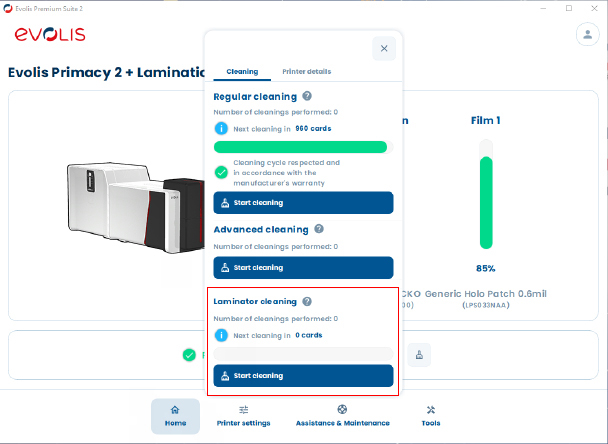
Laminator cleaning information in the driver interface
- What it is - Laminator cleaning status is now visible directly in the Evolis Premium Suite 2 driver, improving maintenance and uptime.
- Applies to - Primacy 2 Lamination and Agilia Lamination.
- Note for Agilia - Requires the next Agilia firmware release (greater than 3.3.21) for this information to appear.
Enhancements
- Digital erasing for magnetic data - Magnetic stripe data is now erased via the Digital Erasing option.
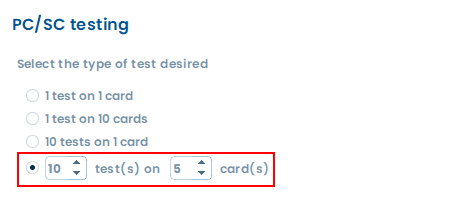
- Configurable ATR read tests - For encoder-equipped printers, you can customize the number of successive ATR read tests in the PC/SC control wizard to facilitate multi-card controls.
General user interface improvements
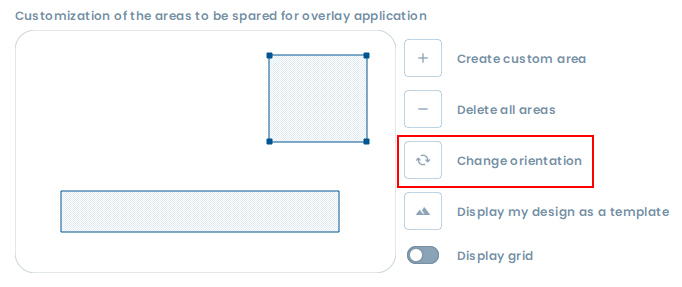
- Orientation handling - Portrait and landscape orientation management is generalized for custom areas, with automatic synchronization across menus.
- Context-aware color profile - The color profile feature is hidden when a monochrome ribbon is installed to avoid confusion.
- Keyboard shortcuts - Escape closes modal windows, F5 updates current settings, Delete and Backspace delete custom areas.
- Faster printer access - Select and open the printer you want directly from the list of connected printers in the system tray context menu.
Bug fixes
- Overlay application - Fixed to ensure correct application of overlay during printing.
Download and release notes
You can download Evolis Premium Suite 2 version 9.1.0 (Build 32237) and view the full release history on the Evolis website:
Aptika recommendation
We recommend that all customers using Agilia, Primacy 2, and Zenius 2 update to the latest Evolis Premium Suite 2 and printer firmware for optimal performance and access to the newest features.
Image placeholders
- Feature - Laminator cleaning information interface
- Enhancements - UI improvements overview
- Enhancements - Keyboard shortcuts cheat sheet
Tagged on: driver, firmware, agilia, primacy 2, zenius 2, evolis